1. 웹(Web)
• 월드 와이드 웹(WWW 또는 W3; World Wide Web)의 줄임말
• 전 세계를 연결하는 인터넷 망을 통해 서로 정보를 공유하는 정보 서비스 공간
# 웹 정보의 작성과 표현
• HTML(Hyper Text Markup Language)언어로 표현되는 웹 문서로 작성(정적 문서와 동적문서로 구분)
@ 정적문서란?
- static !! 아무런 변화가 없이 보여지는 페이지
@ 동적문서란?
- 매번 웹 페이지를 불러올 때마다, 새로운 내용을 표시하는 웹 페이지
• 웹 서비스 : 네트워크 상에 분산된 자원을 공유하기 위한 서비스
- SOAP 기반 웹 서비스
- Restful 기반 웹 서비스
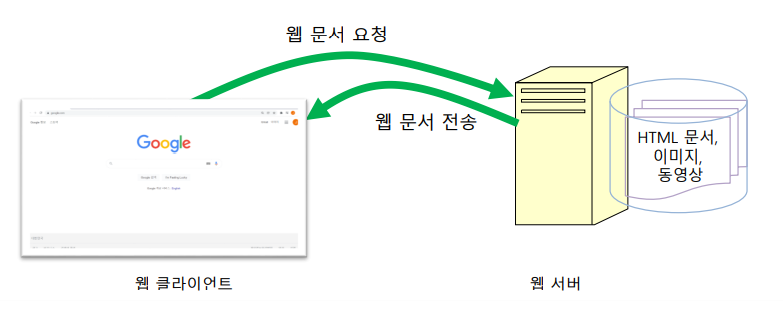
# 웹 서버
• 클라이언트로부터 서비스 요청을 받음
• 서비스 요청에 따른 웹 Application 실행
• 서버 처리결과를 클라이언트에 응답
# HTML5
• Hyper-text markup language
- Page 주소를 기술하기 위해 markup language 사용
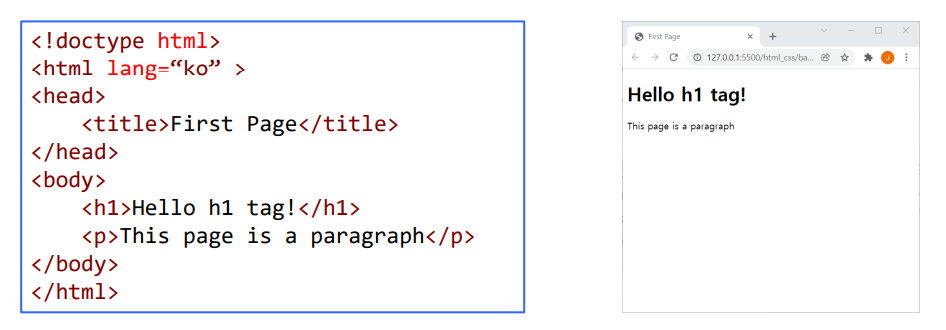
• 페이지 구조 : element로 구성되며, tag로 나타낸다.
@ element 구조?
- 요소, 구성 요소, 원소, 성분
• Semantic(의미를 아는) Elements
- Browser와 개발자에게 요소의 의미를 정확히 서술해준다.
# HTML Element
• Basic HTML
| <!DOCTPE>, <html>, <head>, <title>, <body>, <h1> to <h6>, <p>, <br>, <hr>, <!-- ..--> |
• Formatting
| <b>, <del>, <em>, <mark>, <pre>, <small>, <strong>, <time>등 |
• Forms and Input
| <form>, <input>, <textarea>, <button>, <select>, <optgroup>, <option>, <label>, <fieldset>, <legend>, <datalist>, <output> |
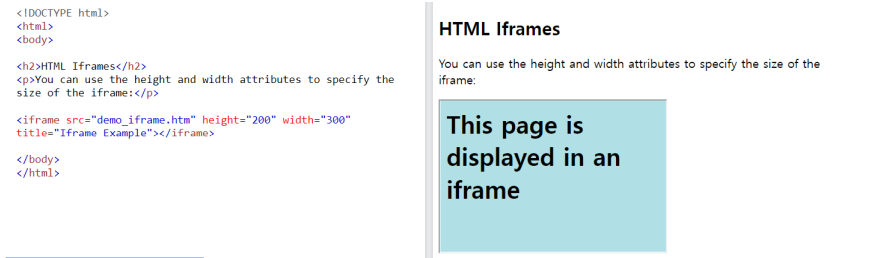
• Frames
| <iframes> |
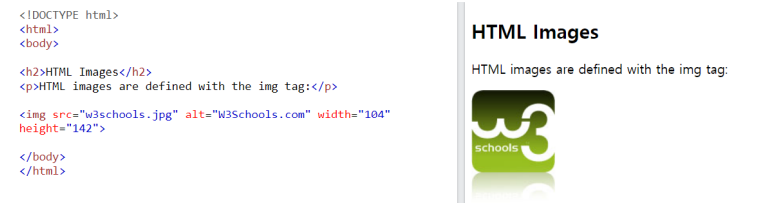
• Images
| <img>, <canvas>, <figcaption>, <figure>, <picture>, <svg> |
• Audio / Video
| <audio>, <source>, <track>, <video> |
• Links
| <ul>, <ol>, <li>, <dl>, <dt>, <dd> |
• Tables
| <table>, <caption>, <th>, <tr>, <td>, <thead>, <tbody>, <tfoot>, <col>, <colgroup> |
• Styles and Semantics
| <style>, <div>, <span>, <header>, <footer>, <main>, <section>, <article>, <aside>등 |
• Meta Info
| <head>, <meta> |
• Programming
| <script> |
# HTML-tags
• HTML headings

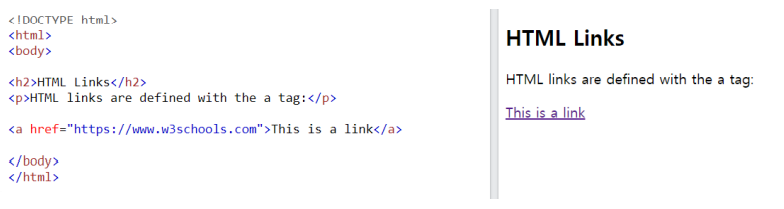
• HTML links
• HTML headings
• HTML buttons

• HTML lists
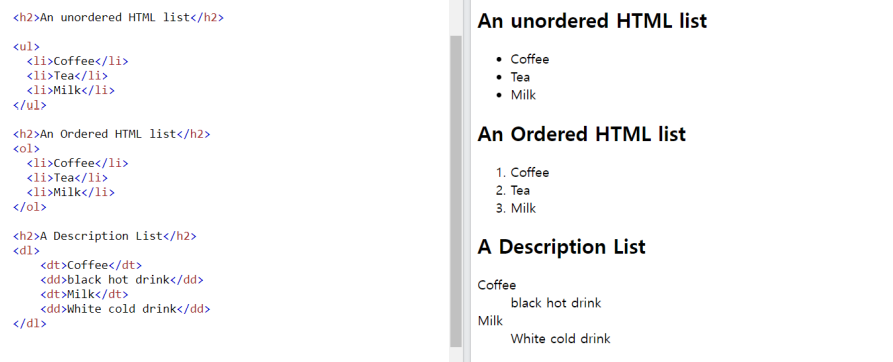
• iframes
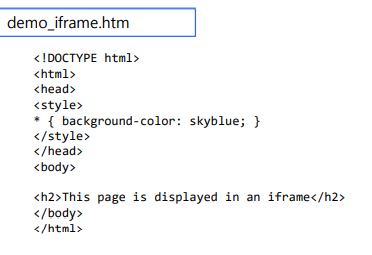
• table
<!DOCTYPE html>
<html lang="en">
<head>
    <meta charset="UTF-8">
    <meta http-equiv="X-UA-Compatible" content="IE=edge">
    <meta name="viewport" content="width=device-width, initial-scale=1.0">
    <title>Table example</title>
    <style>
        table, th, td{
            border: 1px solid blue;
        }
    </style>
</head>
<body>
    <table>
        <thead>
            <th>company</th>
            <th>contact</th>
            <th>country</th>
        </thead>
        <tr>
            <td>삼성</td>
            <td>321-2222</td>
            <td>Korea</td>
        </tr>
        <tr>
            <td>LG-CNS</td>
            <td>321-2222</td>
            <td>Korea</td>
        </tr>
    </table>
</body>
</html>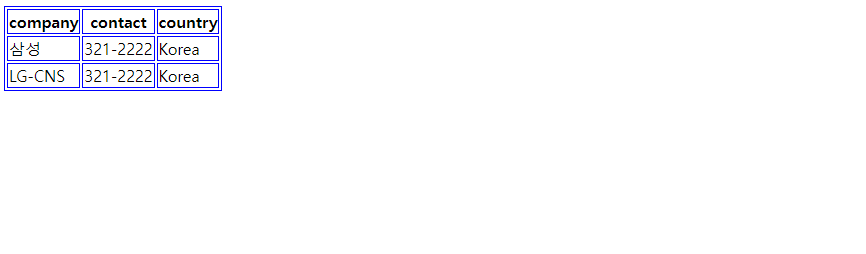
# HTML5에서 플러그인의 도움 없이 오디오/비디오 삽입
<!DOCTYPE html>
<html lang="en">
<head>
    <meta charset="UTF-8">
    <meta http-equiv="X-UA-Compatible" content="IE=edge">
    <meta name="viewport" content="width=device-width, initial-scale=1.0">
    <title>Document</title>
</head>
<body>
    <audio controls sutoplay>
        <source src="video/bb.mp3" type = "audio/mp3">
    </audio>
    <hr>
    <video poster="xx.jpg" width="500" height="300" autoplay controls>
        <source src="video/sunrise.mp4" type="video/mp4">
    </video>
</body>
</html>
# HTML Forms
• <form> - Form 콘트롤 영역
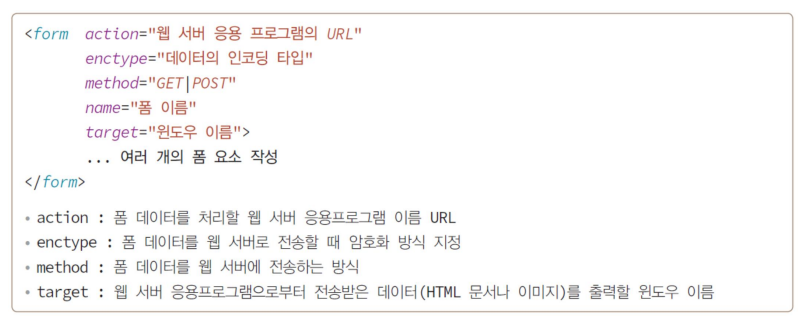
• <input> - 입력 요소. 속성값에 따라 그 유형이 달라짐
<!DOCTYPE html>
<html lang="en">
<head>
    <meta charset="UTF-8">
    <meta http-equiv="X-UA-Compatible" content="IE=edge">
    <meta name="viewport" content="width=device-width, initial-scale=1.0">
    <title>Document</title>
</head>
<body>
    <h2>The form target attribute</h2>

    <p>When submitting this form, the result will be opened in a new browser tab:</p>

    <form action="/" target="_blank" method="get">
        <!-- target="blank" : 한번 열린 탭에서(새로운 탭이 열리는 것 X) -->
        <label for="fname">First name:</label><br>
        <input type="text" id="fname" name="fname" value="John"><br>
        <label for="fname">Last name:</label><br>
        <input type="text" id="lname" name="lname" value="Doe"><br><br>
        <input type="submit" value="Submit">
    </form>
</body>
</html>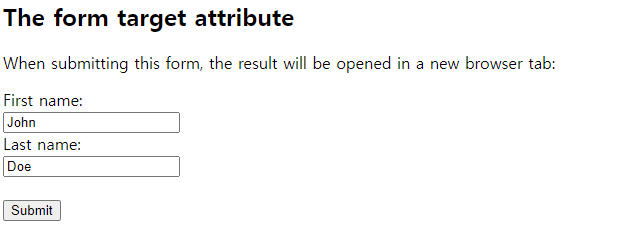
• <button> - 버튼
• <textarea> - 여러 줄을 입력할 수 있는 입력창
• <select> - 셀렉트박스 영역
<!DOCTYPE html>
<html lang="en">
<head>
    <meta charset="UTF-8">
    <meta http-equiv="X-UA-Compatible" content="IE=edge">
    <meta name="viewport" content="width=device-width, initial-scale=1.0">
    <title>Document</title>
</head>
<body>
    <form action="#" method="get">
        <select name="cars">
            <option>Volvo</option>
            <option selected>Sonata</option>
            <option>Tesla</option>
        </select>
        <hr>
        <select size="3" id="class" multiple>
            <option value="archi">건축공학과</option>
            <option value="mechanic">기계공학과</option>
            <option value="indust">산업공학과</option>
            <option value="elec">전기전자공학과</option>
            <option value="computer" selected>컴퓨터공학과</option>
            <option value="chemical">화학공학과</option>
        </select>
        <input type="submit" value="submit">
    </form>
</body>
</html>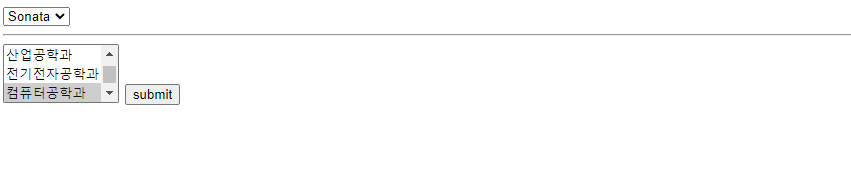
• <option> - 셀렉트박스 옵션
• <fieldset> - Form 요소 분류
• <legend> - Form 요소 분류 제목
• <label> - Form 요소 정보
<!DOCTYPE html>
<html lang="en">
<head>
    <meta charset="UTF-8">
    <meta http-equiv="X-UA-Compatible" content="IE=edge">
    <meta name="viewport" content="width=device-width, initial-scale=1.0">
    <title>Document</title>
</head>
<body>
    <form action="action_page">
        <fieldset>신청 과목
            <p>신청할 과목을 선택하세요</p>
            <!-- radio : 3개중 하나 -->
            <label><input type="radio" name="subject" value="speaking">회화</label>
            <label><input type="radio" name="subject" value="grammar">문법</label>
            <label><input type="radio" name="subject" value="writing">작문</label>
        </fieldset>


        <fieldset>
            <legend>메일링</legend>
            <p>뉴스주제를 선택해주세요</p>
            <!-- 체크박스 : 여러개 선택 가능 -->
            <label><input type="checkbox" name="mailing1" value="news">해외 단신</label>
            <label><input type="checkbox" name="mailing2" value="dialog">5분 회화</label>
            <label><input type="checkbox" name="mailing3" value="pops">모닝팝스</labreset>
        </fieldset>

        <input type="image" value="">
        <input type="submit" value="전송">
        <input type="reset" value="초기화">
    </form>
</body>
</html>

'Front-End > HTML5&CSS' 카테고리의 다른 글
| CSS 과제실습 (1) | 2022.10.12 |
|---|---|
| part08_images (0) | 2022.05.13 |
| part07_Video요소 (0) | 2022.05.13 |
| part06_HTML유효성검사 (0) | 2022.05.13 |
| part05_Semantic요소 (0) | 2022.05.13 |